Only what matters, by default
Candles, volume, VWAP and the levels traders actually trade around. Nothing else is on the screen until you ask for it.

Desktop charting for SPX and ES traders
A clean chart with the levels that matter, already drawn.
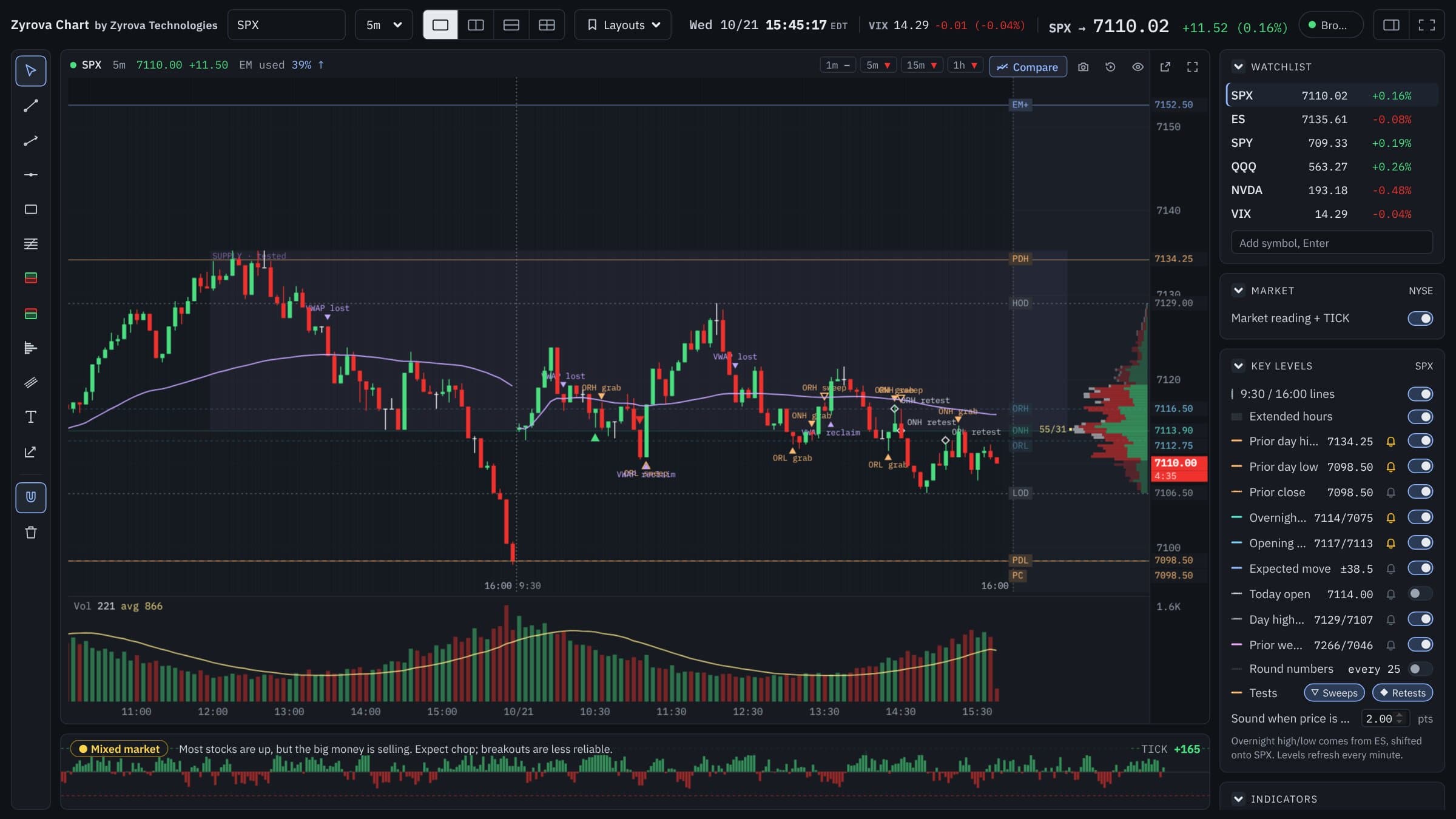
Most charts bury price under dozens of lines, panels and pop-ups. Zyrova Chart starts from the opposite side: candles, volume, VWAP and the levels SPX and ES traders watch every day, drawn for you before the open. Prior day, overnight, opening range and the expected move, with a clear mark when price grabs, sweeps or retests one of them. Everything else is one switch away, and off until you want it.
Simplicity first
When a trade is moving, you don't have time to look for the one line that matters among twenty. Zyrova Chart is built around a simple rule: if a trader doesn't look at it every day, it isn't on the chart by default.
Candles, volume, VWAP and the levels traders actually trade around. Nothing else is on the screen until you ask for it.
Supply and demand, fair value gaps, big trades, delta, sweeps and marks each sit on their own switch in one panel. Turn on what you use and forget the rest.
Levels are short codes like PDH, ONL and ORH beside the price axis, in the gap right of the last candle. They never sit on top of price.
The eye button on each chart hides every level and indicator and leaves just the candles, for when you want to read price alone.
What we left out on purpose
Key levels
You shouldn't have to redraw yesterday's high every morning. Zyrova Chart works out the levels from the candles and draws them as soon as the chart opens, refreshing every minute. Knowing where price is likely to react, before it gets there, is what lets you plan a trade instead of chasing one.
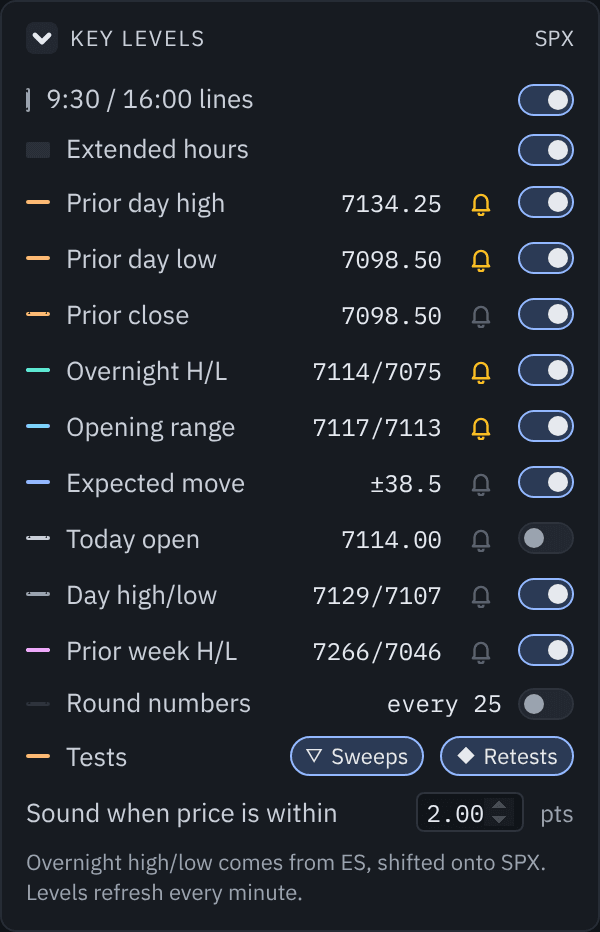
Where yesterday's buyers and sellers stopped. The first places price is likely to react.
Taken from ES and shifted onto SPX, so an SPX chart shows where the futures traded while the index was closed.
The high and low of the first 15 minutes after 9:30, the range many traders use to judge whether the day is going to trend.
The options market's expected range for today, from the 9:30 at-the-money straddle, drawn above and below the open.
Next to the price: how much of today's expected move price has already travelled, so you know when the usual day's range is spent.
Ready in the same panel, off by default, one switch each.
Tap the bell next to a level and the app plays one sound, with a short note, when price comes within the distance you set. No need to stare at the chart while you wait for price to get there.
Tests at your levels
A level is only useful if you can see how price treats it. Zyrova Chart marks the moments that matter at the prior day, overnight and opening range levels, with small, quiet symbols instead of arrows all over the chart. Both sets of marks are two small buttons on the panel, off until you turn them on.
A wick pokes through a key level and the same candle closes back inside. A solid triangle marks it.
Price closes beyond a key level, then comes back inside within 3 candles. A hollow triangle marks it.
Price breaks a level, holds beyond it, then comes back to it from the new side and holds. A small diamond marks it.
A small mark when price closes back above VWAP after a run below it, or below after a run above. At most one every 30 minutes, so it never crowds the chart.
Marks describe what already happened on a closed candle. They are not signals and do not say what price will do next.
Market reading
SPX doesn't move alone. A strip under the charts reads NYSE TICK, ADD and VOLD for you and says in one sentence whether buyers, sellers or neither are in control, so you know whether to trust a breakout before you take it.

TICK, ADD and VOLD turned into plain English: Buyers in control, Sellers in control or Mixed market, and one line on what that usually means for the day.
Every NYSE TICK reading of the session as green and red bars under the charts, so you see when buying or selling waves hit.
Up, down or mixed on the 1, 5, 15 and 60-minute candles for each chart's symbol, in the chart's header. When all four agree, the trend is clear.
The reading describes the market right now. It is not a signal and does not say what price will do next.
Steady data
A chart that quietly freezes is worse than no chart. Zyrova Chart watches its own connection to IB Gateway and every price feed, fixes what it can by itself, and shows you plainly when something is off.
If IB Gateway isn't running, the app offers to open it. After you log in, the charts load by themselves.
When the connection drops, after Gateway's nightly restart or a Wi-Fi blip, Zyrova Chart reconnects and picks every chart back up.
After any drop it reloads the candles it missed, and every 2 minutes it checks the newest candles against Interactive Brokers' own.
A small dot by each symbol: green when prices are live, amber when none came for a while with the market open, red while it reconnects.
A day with Zyrova Chart
Open the app and the prior day, prior close and overnight levels are already drawn. Set a price alert on the level you care about and leave it.
A thin line marks the open. After 15 minutes the opening range is drawn, and the expected move appears from the open.
Watch how price behaves at each level: a grab, a sweep, a break and retest, VWAP reclaimed or lost. EM used tells you how much room the day usually has left.
Replay the day candle by candle with the levels as they stood, and practise your entries before tomorrow.
Order flow on the chart
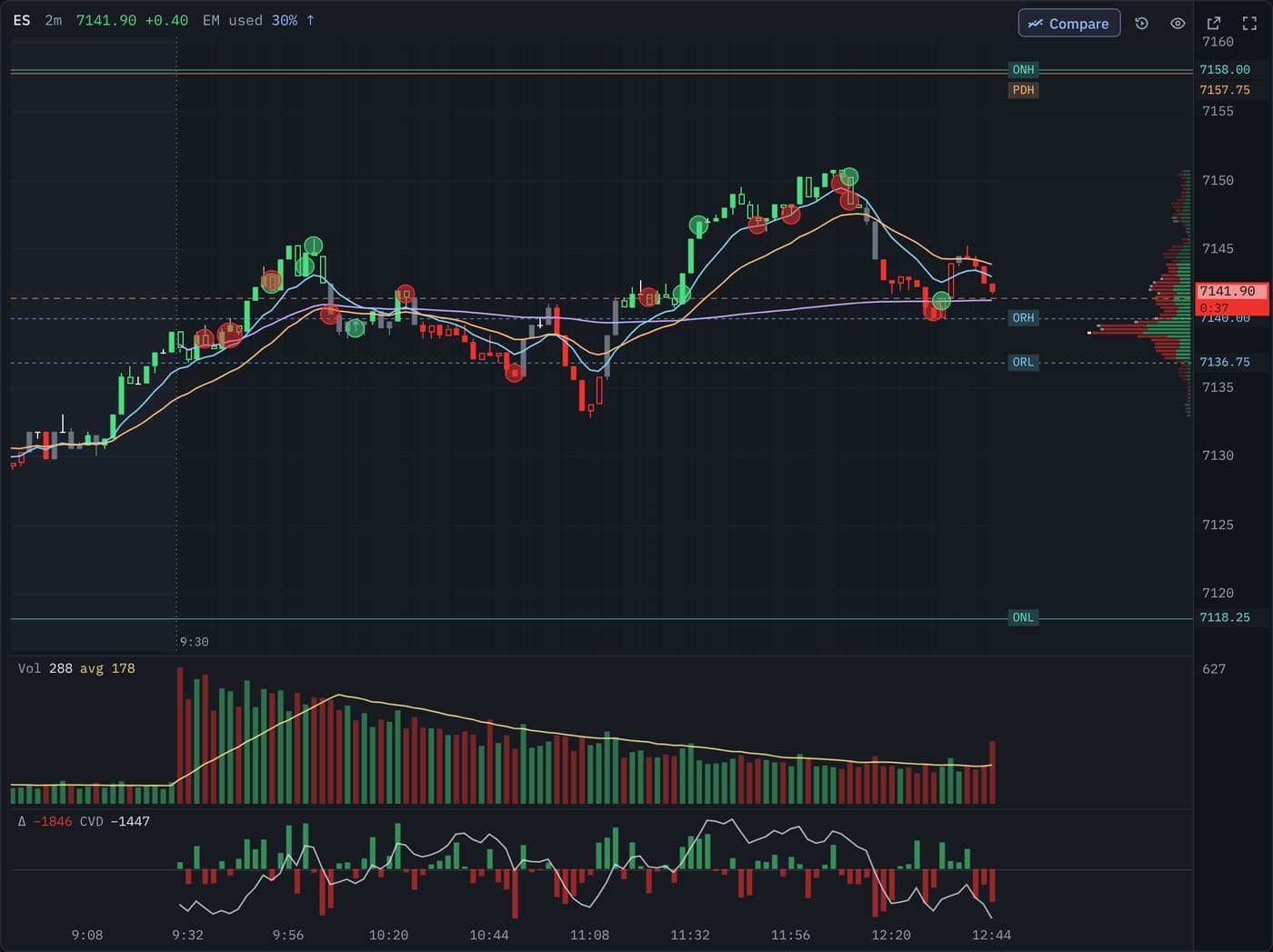
Turn on Big trades and every large trade shows as a bubble at its price: green when a buyer lifted the offer, red when a seller hit the bid, bigger for more size. You set the minimum size per symbol, 50 ES contracts to start.
Turn on Delta and a thin pane under the volume shows buying minus selling in each candle, with the cumulative delta line restarting at 9:30. When price makes a new high and delta doesn't, you see it.
On an SPX chart both come from ES trades, because the index itself has no trades to read.
Bar replay
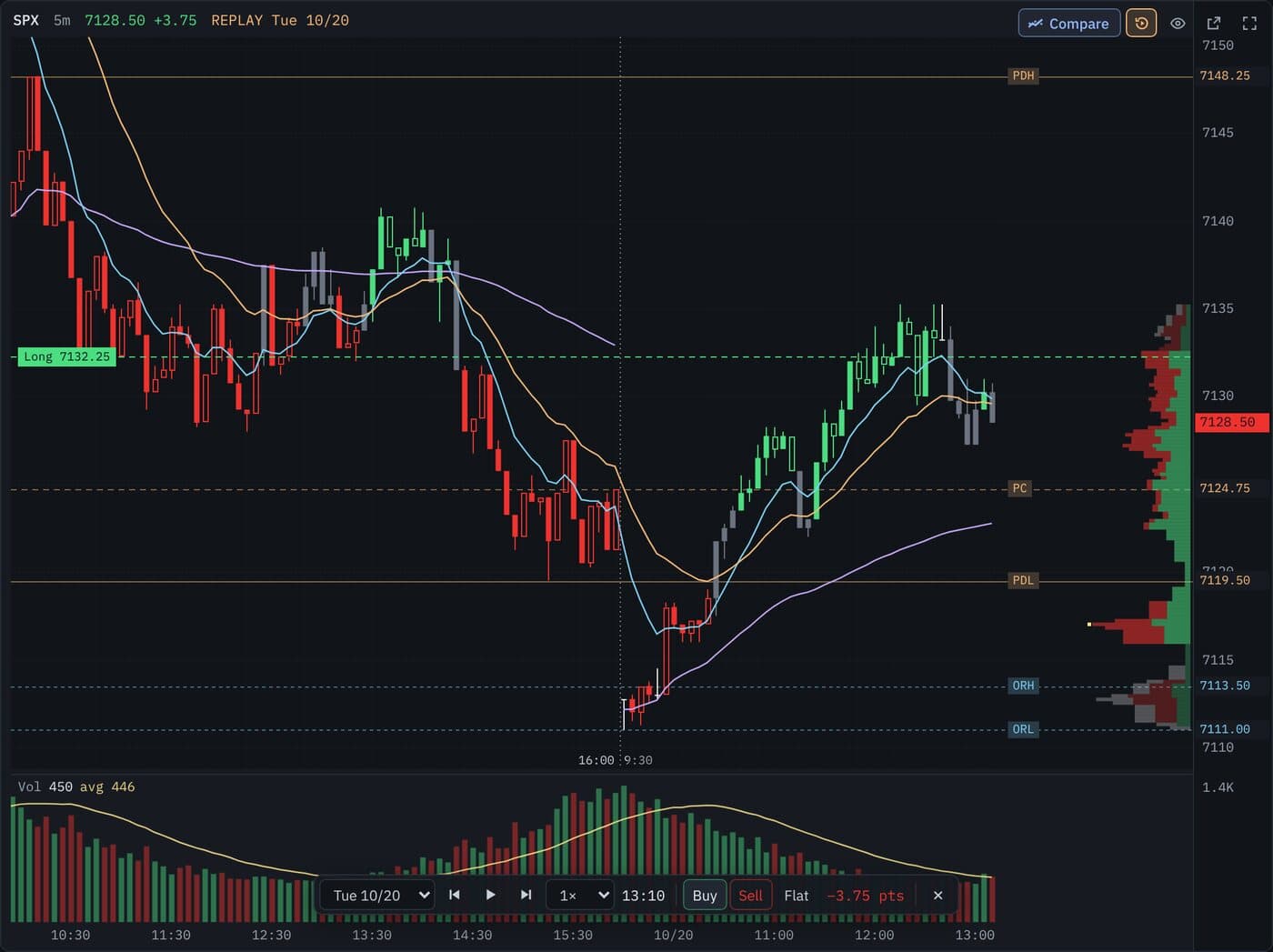
Pick a day and the chart goes back to that morning. Play it at 1 to 10 candles a second, pause with Space, or step one candle at a time with the arrow key. The key levels are worked out as they stood that day, so you see exactly what you would have seen live.
Press Buy, Sell or Flat to take practice trades at the candle close and see the result in points. Nothing is sent to your broker, and nothing from replay is saved.
Compare
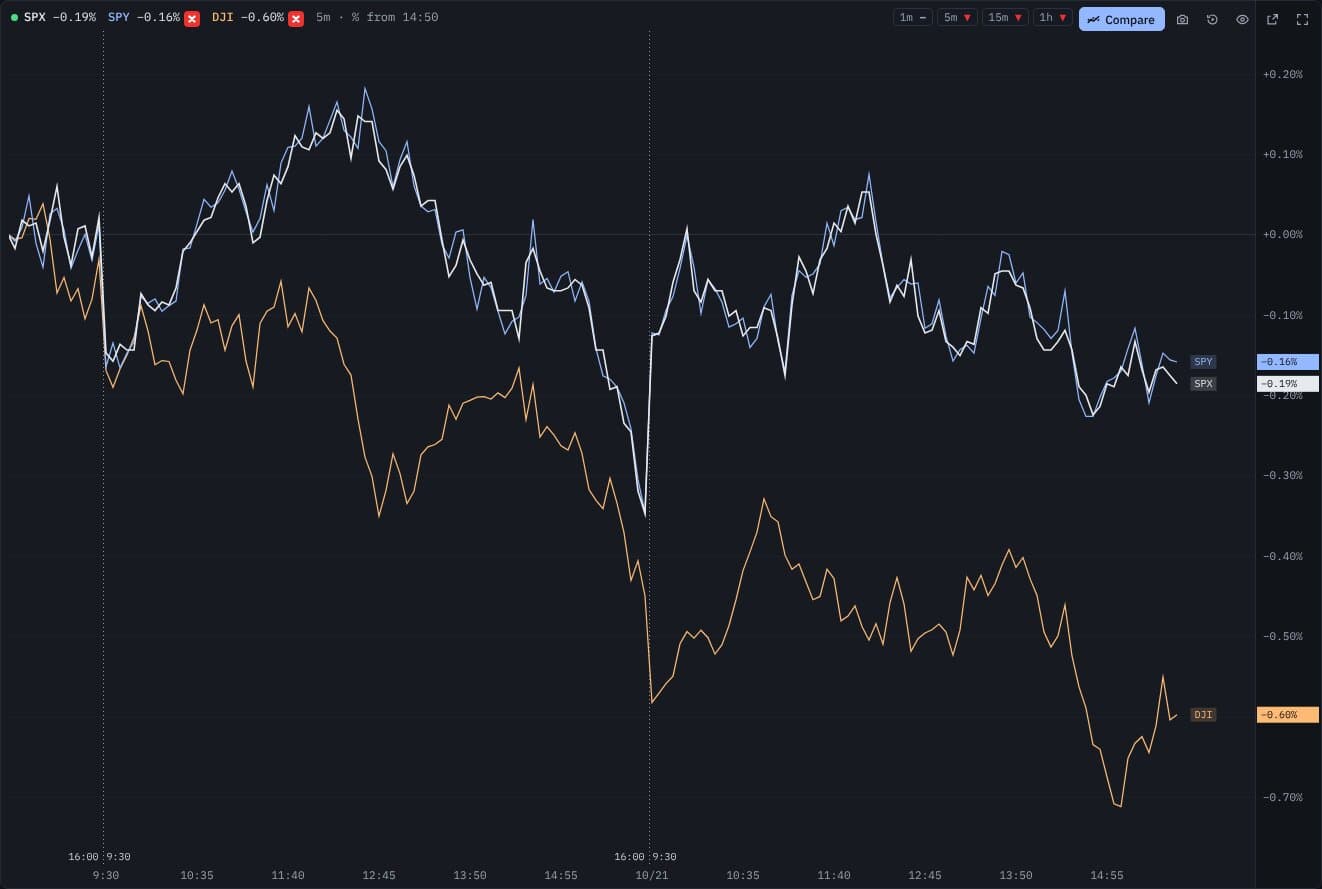
Press Compare and add up to two more symbols. Each one becomes a line showing its percent change from the same starting point, so SPX, SPY and the Dow sit on one scale and you can see at a glance which is stronger and which is lagging.
When SPX holds up while the Dow slips, or SPY breaks away from SPX, it shows right away. Each line keeps its own colour and its change sits at the price axis. It works on every timeframe down to 1-second candles. The red × next to a symbol removes it, and removing the last one puts the candles back.
Everything you need, nothing in the way
Simple doesn't mean limited. The tools are there, they just wait in the side rail and the panel until you reach for them.
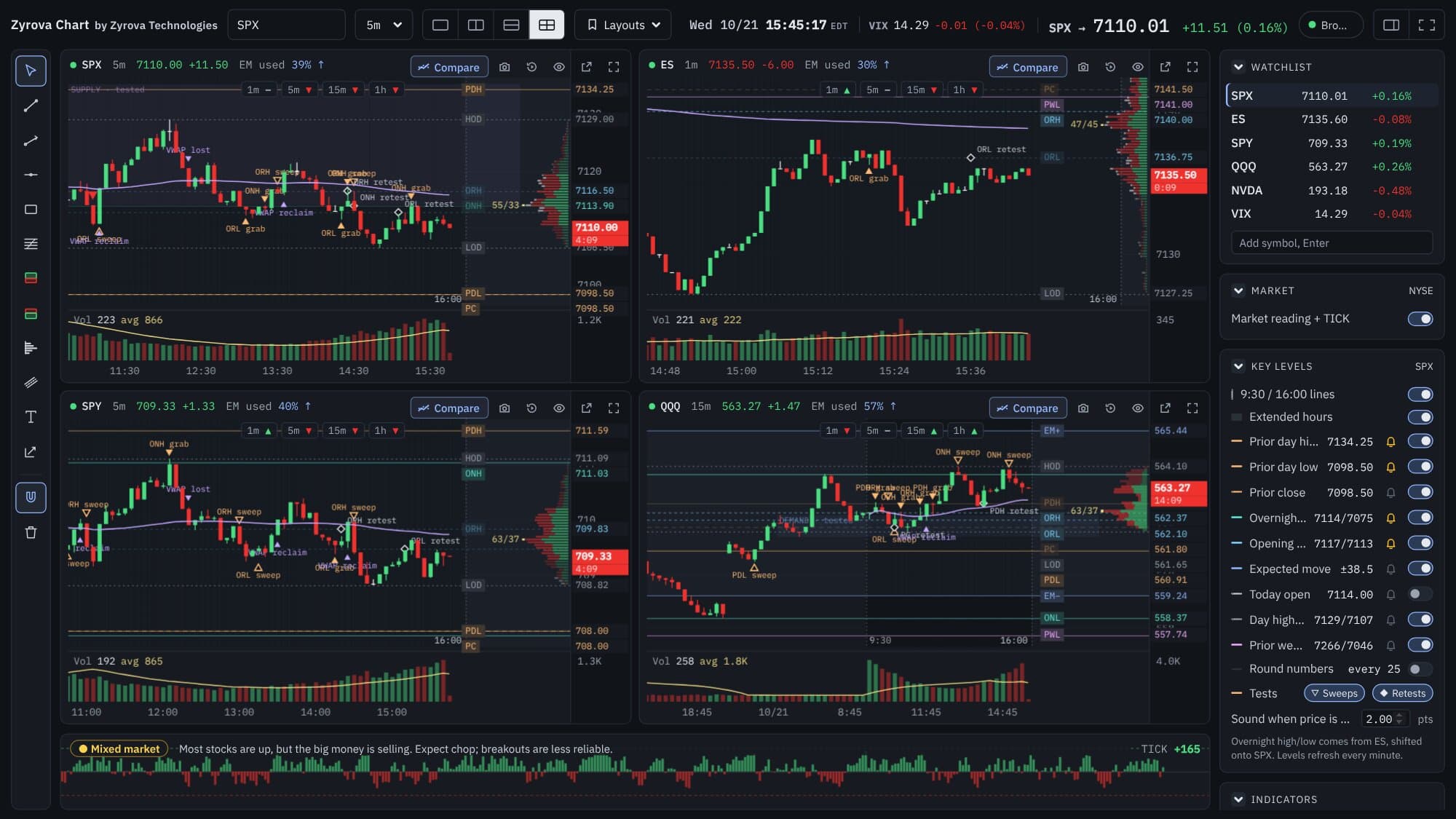
One, two side by side, two stacked, or four charts, each with its own symbol and timeframe. It opens with SPX 5-minute over ES 1-minute. Save layouts and switch in one click.
Pop any chart into its own window for a second monitor. Keep it independent or link it to follow the main window's symbol.
1 second to weekly. Up to three years of daily candles, and the history you load is kept on your PC so it opens instantly next time.
Trend line, ray, horizontal line, rectangle, Fibonacci, long and short position box, parallel channel, fixed range volume profile, text notes, with a magnet to snap to candles.
Right-click a key level, a price line or a trend line to be alerted when price crosses it.
Where volume traded today, beside the price axis, with buying and selling in two colours. The busiest price shows its buyer and seller split, and any bar shows its own on hover.
The camera button copies a picture of one chart, all charts or an area you drag, ready to paste into a chat or journal, and saves it as a file too.
Your symbols with live prices and change on the day. Drag to reorder, click to load.
Light and private
Zyrova Chart is a native Windows app, not a web page in a browser tab. It starts in a moment, redraws only when a new price arrives, and keeps everything on your own computer. It talks to your broker's gateway on your PC and nothing else.
4 MB
installer
12 MB
installed
Native
Windows app, not a browser tab
On your PC
charts, drawings, alerts and history
What you will need
64-bit. A 4 MB installer, no admin rights needed.
Zyrova Chart connects to IB Gateway on your computer and uses your own account's market data.
For SPX the Cboe index data, for ES the CME data, and OPRA for the expected move. Stocks use the US securities bundle.
Tuned for SPX, SPX options traders and ES. It also charts NQ, stocks such as SPY, QQQ and NVDA, and VIX.
Where it is at
Built
Key levels and bells, expected move, tests at levels, VWAP marks, market reading, big trades, delta, replay, compare, snapshots, layouts, drawings and alerts are working.
Testing on live markets
Checking every level and mark on live SPX and ES sessions before release.
Launch on zyrova.com
Download the Windows installer from this page with a subscription.
Pricing
No tiers to compare and no features held back. Start with a 7-day free trial, then choose monthly or yearly.
$19.99per month
Cancel any time. Access runs to the end of the month you paid for.
$99.50$199first year
Renews at $199 a year.
Two months free compared with paying monthly.
Launch offer for the first 100 customers: 50% off your first year
Zyrova Chart isn't on sale yet. Join the waitlist to hear first when the download and the launch offer open. Prices are in US dollars and taxes may apply. Your market data subscriptions are billed by Interactive Brokers, not Zyrova.
Waitlist
Join the waitlist and we will email you when the Windows download is ready.
Questions
No. It draws levels and marks what price did at them. It never recommends buying, selling or holding anything, and any level or mark can fail. You make every decision.
No. It has no order entry and never sends orders. Buy, Sell and Flat in bar replay are practice entries on past candles and stay inside the replay.
Because most of the screen in other charting tools is something you don't use. Zyrova Chart starts with the few things SPX and ES traders look at every day and puts everything else on a switch, so you decide what is on your chart.
From your own Interactive Brokers account through IB Gateway on your computer, with the market data subscriptions on that account. Zyrova Chart has no data feed of its own.
On your PC. Candle history, drawings, alerts, layouts and settings are saved locally and never sent to Zyrova.
SPX doesn't trade overnight, so the overnight high and low come from ES and are shifted onto SPX by the ES to SPX difference.
From the at-the-money SPX straddle at the 9:30 open, drawn above and below the open. It needs OPRA options data on your account, and it is the market's priced range, not a forecast.
No. It describes what NYSE TICK, ADD and VOLD are doing right now in plain words. It doesn't predict where price goes next, and markets often do the opposite of what the breadth suggests.
The dot by each symbol turns red, the app reconnects by itself and reloads the candles it missed. If Gateway isn't running at all, the app offers to open it for you.
Yes. They are built from the every-trade feed while the app runs, so start it before 9:30. Today's are kept if you restart.
It is a native app with a 4 MB installer, and charts only redraw when a new price arrives, so it stays light even with four charts streaming.
Zyrova Chart is built for Windows 10 and 11.
$19.99 a month or $199 a year, with everything included and a 7-day free trial. The first 100 customers on the yearly plan pay $99.50 for their first year (50% off). The monthly plan is always $19.99.
Yes, 7 days for everyone. Enter your email in the app and the trial key arrives by email. No card is needed to start.
One subscription works on 1 Windows PC at a time. You can move it to a new PC from inside the app.
Zyrova Chart used to be called Delphi Chart. We changed the name for trademark reasons, and we are sorry for any confusion. It is the same product, built by the same team at Zyrova Technologies, on the same website, with the same features.
Zyrova Chart is charting software, not financial advice.
Important Zyrova Chart disclosure
Disclosure version: ZYROVA-CHART-RISK-2026-10-24-v2
This product-specific disclosure supplements the company-wide Zyrova Technologies Terms of Service. Zyrova Chart is desktop charting software. It displays prices, candles, volume, key levels, expected moves, indicators, marks, alerts and replays for informational and educational purposes only. Website screenshots use sample prices from the app's built-in simulator and are not trading results.
Zyrova Technologies LLC is not a broker-dealer, investment adviser, commodity trading adviser, fiduciary, exchange, tax adviser, legal adviser, or trade-execution service. Nothing shown by Zyrova Chart is individualized investment advice, a suitability determination, an offer or solicitation, or a recommendation or instruction to buy, sell, hold, or trade any security, option, futures contract, derivative, or other financial instrument. Zyrova Chart does not place or execute trades. Buy, Sell and Flat in bar replay are practice entries on past candles only and never send orders.
Labels such as key level, expected move, EM used, grab, sweep, retest, VWAP reclaim or lost, supply, demand, fair value gap, big trade, delta, trend, buyers in control, sellers in control, mixed market, TICK, ADD, VOLD or similar describe software-generated market context only. They are not predictions, guarantees, signals or instructions to trade, and the same rules applied to past data do not mean the same outcome in the future. Features, calculations, thresholds, terminology, pricing and packaging may change, be corrected, or be discontinued as the product evolves, subject to applicable law and binding written commitments.
Zyrova Chart shows the market data that your own Interactive Brokers account and subscriptions provide through IB Gateway. Prices, history, levels, trade classifications, alerts and other displays may be delayed, incomplete, inaccurate, unavailable, or affected by your broker, data providers, connection, computer or other services outside Zyrova's control. Alerts and level sounds may not fire or may fire late, and the live feed indicator, automatic reconnection and candle corrections cannot guarantee that every price is received or shown on time. Interactive Brokers is a trademark of its owner; Zyrova Chart is not affiliated with, endorsed by, or sponsored by Interactive Brokers.
Trading and investing involve substantial risk. Options, zero-days-to-expiration products, leveraged instruments, futures, and short-dated strategies can lose value rapidly, including the possible loss of the entire amount committed, and some strategies may expose you to losses greater than the initial amount committed. Replay results, practice P&L, examples, historical levels and statistics are not guarantees or indicators of future results.
You are solely responsible for verifying what you see, evaluating suitability, choosing position size, configuring your broker, deciding whether to trade, and making your own financial, tax, and legal decisions. Use of Zyrova Chart is subject to the Terms of Service, including the warranty disclaimers and limitation-of-liability provisions stated there. No marketing statement, example, or informal communication overrides those Terms unless Zyrova expressly agrees otherwise in a signed writing.