1
Analyze
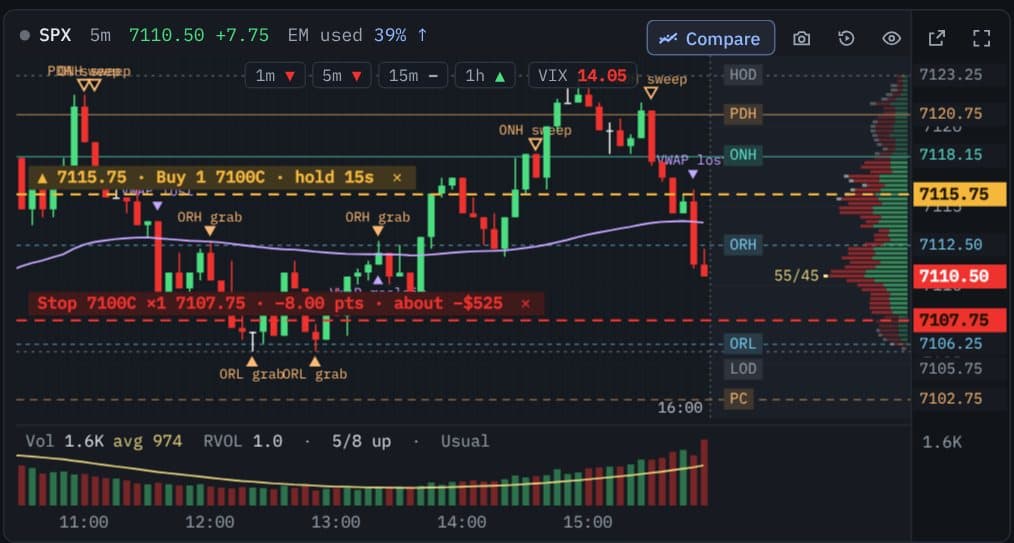
Integrated Zyrova Chart, with the SPX and ES levels drawn for you.

Mark the level on your chart, pick the contract, and submit the order instructions to IBKR from one desktop app.
Zyrova DeskTWS / IB GatewayInteractive Brokers
Not available to download yet. You stay in control. IBKR handles the brokerage.
1
Integrated Zyrova Chart, with the SPX and ES levels drawn for you.
2
Simplified SPX options contract and order controls.
3
Send order instructions to Interactive Brokers with fewer steps.
How it works
Zyrova Desk helps you prepare and submit order instructions faster through a simplified interface. Interactive Brokers remains responsible for receiving, validating, accepting, rejecting, routing and executing orders.
1 · On your PC
Zyrova Desk
You select the contract, quantity, price and order type.
2 · On your PC
TWS / IB Gateway
Connects Zyrova Desk to your IBKR account.
3 · Broker
Interactive Brokers
Processes the order and determines its acceptance, rejection, routing and execution.
Zyrova never sees your IBKR login, account, positions or trades. Zyrova does not act as a broker, hold customer funds, or execute trades.
Ways to place an order
Every order below is prepared in Zyrova Desk and submitted as an order instruction to your IBKR account. You choose every contract, quantity, price and level. IBKR accepts, rejects, routes and executes it.
Order panel
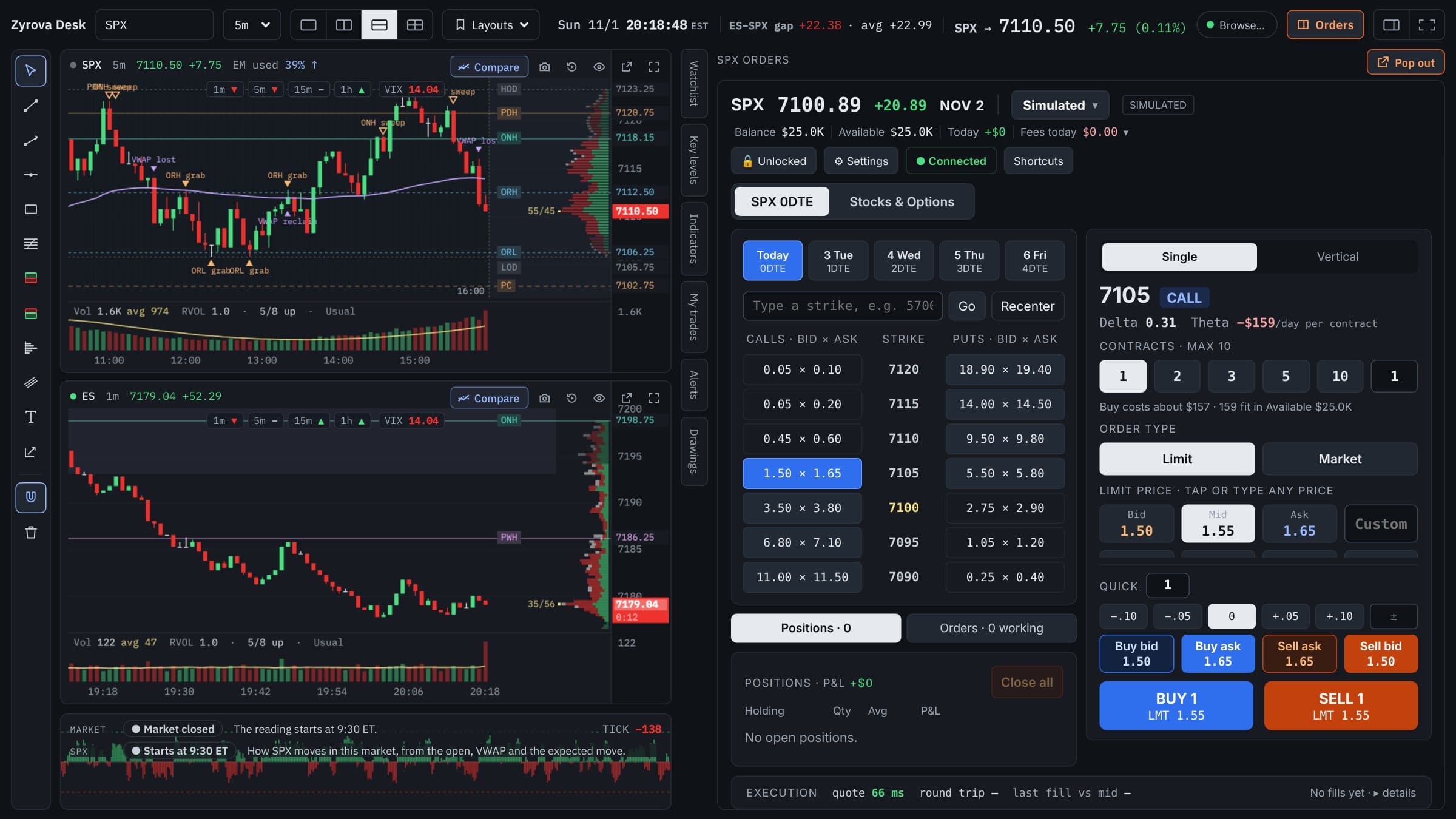
Click a bid or ask in the SPX chain, choose quantity and price (bid, mid, ask or your own), then Buy or Sell.
Order panel
One click at the bid or ask with your preset quantity and price steps.
Order panel
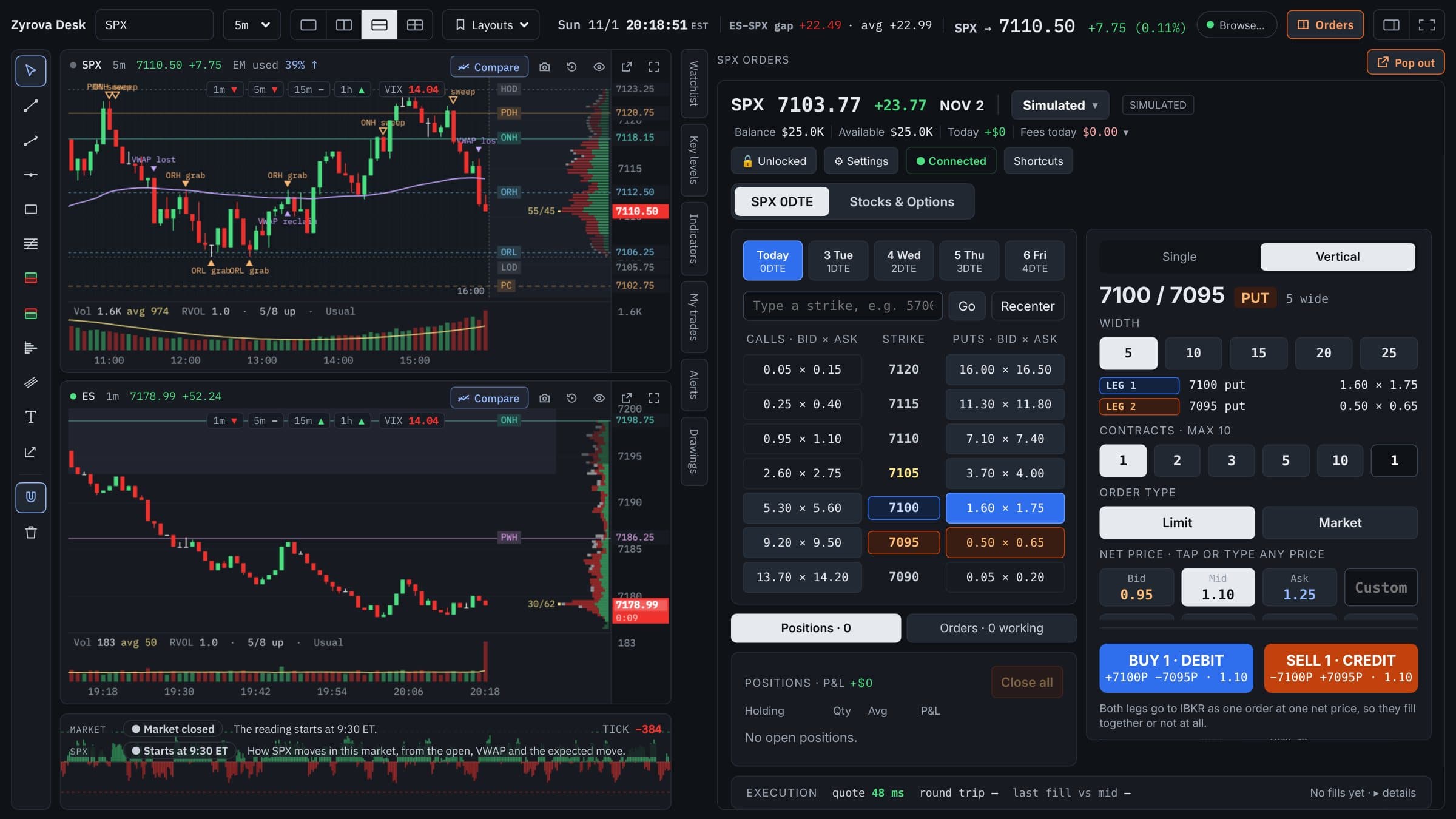
Pick a width; both legs go to IBKR as one combo order at one net price, so they fill together or not at all.
On the chart
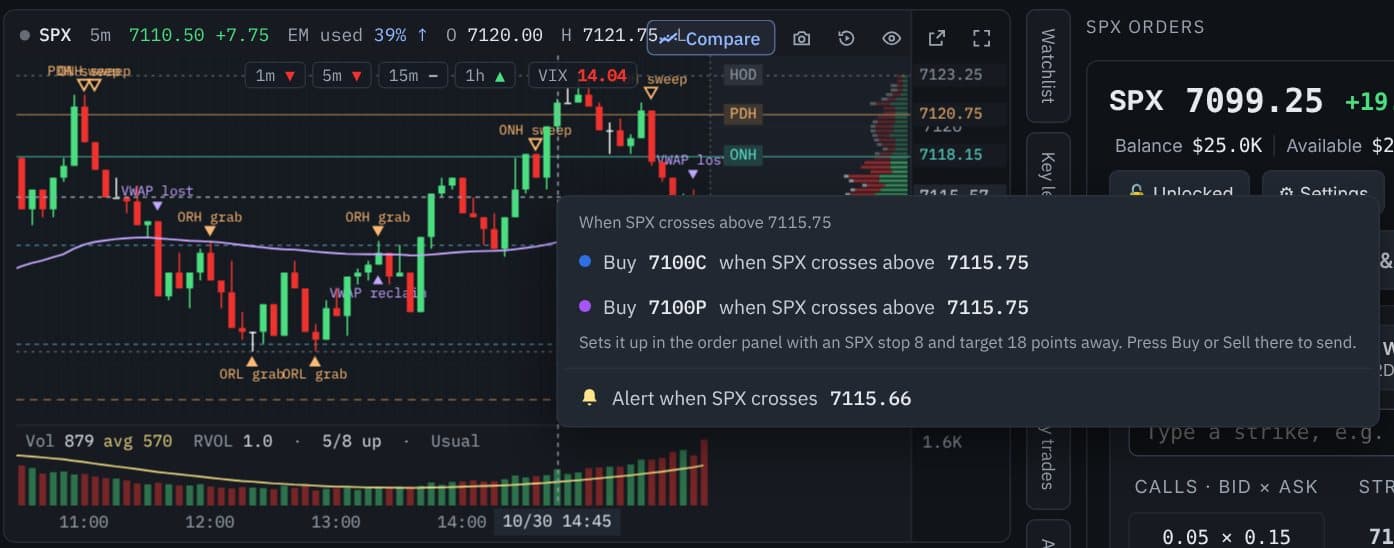
You choose the level and contract, for example Buy 7100C when SPX crosses above 7115.75. It fills in the order panel with your stop and target, and you press Buy to arm it.
On the chart
Lines you place on SPX price that sell your option when SPX touches them, with an optional trail. Drag a line to move it.
On the chart
Draw a box with entry, target and stop on SPX, and set up the matching call or put order from it.
Features
The full Zyrova Chart beside your order controls: key levels, VWAP, TICK and more, in the same window.
Today's SPX options chain with live bid and ask from your IBKR market data. Click a price to load the contract.
Choose quantity, Limit or Market, and your price, then submit the order to IBKR.
Pick a vertical spread width and both legs are sent to IBKR as one combo order at one net price.
Quick buttons for quantity and price steps, so fewer clicks stand between you and the order.
See your working, filled and canceled orders and your positions as IBKR reports them.
Zyrova Desk connects on your PC to IBKR's own desktop programs. You sign in to IBKR there, not in Zyrova.
Control built in
There is no extra confirmation window: your order instruction goes to IBKR on your click. These settings help you stay in control. They are aids, not guarantees.
A short notice explains how order instructions are sent before the panel unlocks.
Lock the panel so nothing can be submitted until you unlock it.
A per-order limit you set in Settings.
Optional. Pauses new orders when you reach your limit; closing a position is always allowed.
Stops the same order instruction going out twice from a fast second click.
Every order instruction and IBKR response is written to a log you can export.
What you will need
With options trading permissions and real-time market data for what you trade.
IBKR's free desktop programs. You sign in to IBKR there; Zyrova Desk connects to it on your PC.
A native desktop app. Your settings, charts and order log stay on your PC.
Where it is at
License key and agreement
The same license key and trial setup as Zyrova Chart, plus a Zyrova Desk license agreement.
Live testing
Using Zyrova Desk with a real IBKR account and fixing what we find.
Pricing and download
Plans and the Windows download open here when testing is done.
Want charts only? Zyrova Chart is available now.
Get notified
Leave your email and we will write once, when Zyrova Desk opens.
Questions
No. Zyrova Desk is order-entry software. It prepares the order you choose and submits the order instruction to your Interactive Brokers account through TWS or IB Gateway. Interactive Brokers receives, validates, accepts or rejects, routes and executes orders.
Interactive Brokers (IBKR) only. You need your own IBKR account with options trading permissions and market data.
Yes. Zyrova Desk connects to IBKR through TWS (Trader Workstation) or IB Gateway running on your PC. You sign in to IBKR there; Zyrova never sees your IBKR login.
Yes. Pick a width and Zyrova Desk submits both legs to IBKR as one combo order at one net price, so IBKR fills them together or not at all.
Yes. Right-click a price on the SPX chart to set up an order that Zyrova Desk submits to IBKR when SPX crosses your level, and place SPX stop and target lines for what you hold. You choose every level. These orders wait in Zyrova Desk on your PC and only work while it is open and connected.
No. Zyrova is not a broker and holds no customer funds. Your account, positions and orders stay between your PC and Interactive Brokers.
Zyrova Desk is in testing. Pricing and the Windows download will be posted on this page when it is ready. Leave your email to hear when it opens.
Important
Zyrova Desk is an independent software application that provides a simplified interface for preparing and submitting order instructions to a customer's Interactive Brokers account through TWS or IB Gateway. Zyrova does not act as a broker, hold customer funds, or independently execute trades. Interactive Brokers controls order acceptance, routing, and execution.
Zyrova Desk is in testing and not offered for sale or download. Features shown may change before release. Zyrova Technologies LLC is not a broker-dealer or investment adviser, and nothing in the app or on this page is investment advice or a recommendation to trade. Options, including same-day-expiration options, can lose value quickly, including all of the amount paid. You are responsible for every order you submit and trade at your own risk. Interactive Brokers, TWS and IB Gateway are trademarks of their owner; Zyrova Desk is not affiliated with, endorsed by, or sponsored by Interactive Brokers. Use of this website is subject to the Terms of Service.